Reptile & Amphibian Forums

Welcome to kingsnake.com's message board system. Here you may share and discuss information with others about your favorite reptile and amphibian related topics such as care and feeding, caging requirements, permits and licenses, and more. Launched in 1997, the kingsnake.com message board system is one of the oldest and largest systems on the internet.

Click here for Dragon Serpents
https://www.crepnw.com/
Click for 65% off Shipping with Reptiles 2 You

Need a few tips on pictures !? plz

Watever Oct 28, 2009 02:19 PM

Hi,

I tried to take picture of some of my ball pythons, I used my girlfriend camera, a Sony Alpha 350 with the base lenses that came with it (she have other minolta lenses but no macro).

I made a basic light tent with a carton box and 2x150 on the side.

I also made a white balance, 2900k G2 (not sure what that mean but well).

Everything else was on "AUTO" mode with no flash. I just manually did the focus. (I was not used with the camera so didn't bother with adjusting shutter speed and aperture)

Most of my pictures have a grey background even with all the lights I put and with a white balance done.
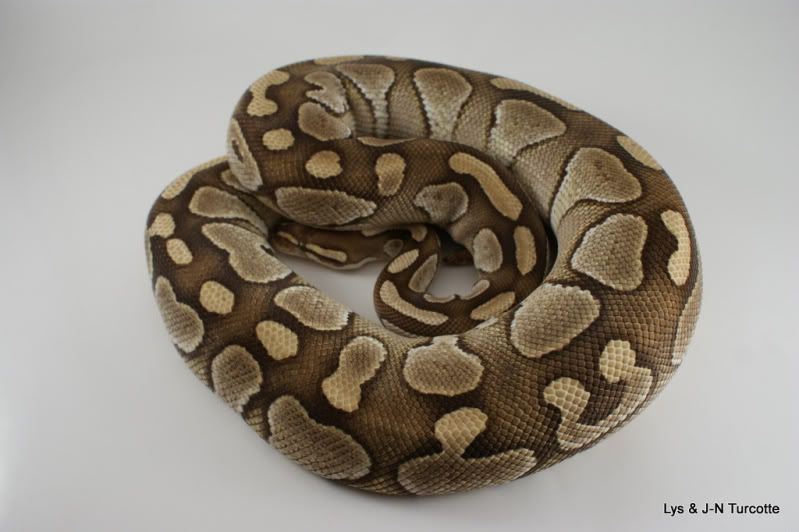
Focal length : 26.0mm (35mm equivalent: 39mm)
1/50s
f/5.0
ISO : 100

Some of the pictures have nicer color and a whiter background but still quite grey.
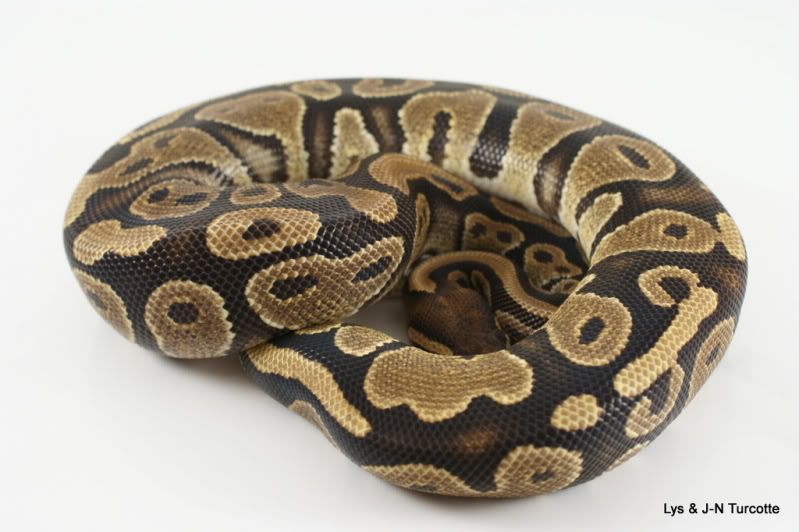
Focal length : 40.0mm (35mm equivalent: 60mm)
1/60s
f/5.6
ISO : 400

I realized that the more ISO I have, the "whiter" are the pictures.
But before I start soothing with higher ISO, is there something else I should do ? What would be a good shutter speed and aperture for taking these pictures ? And what would be a good ISO ?

I also tried to shoot on black, and most of the pictures had the black reflect the light, and was more "dark gray" than black and the colors were off. The few ones that were good were had a lower ISO. Is there anything else than lowering the ISO here ?

There should be "orange" on the side instead of "yellow".

Focal Lenght : 35.00mm (35mm equivalent: 52mm)
1/60s
f/5.6
ISO : 400

A better one with black background
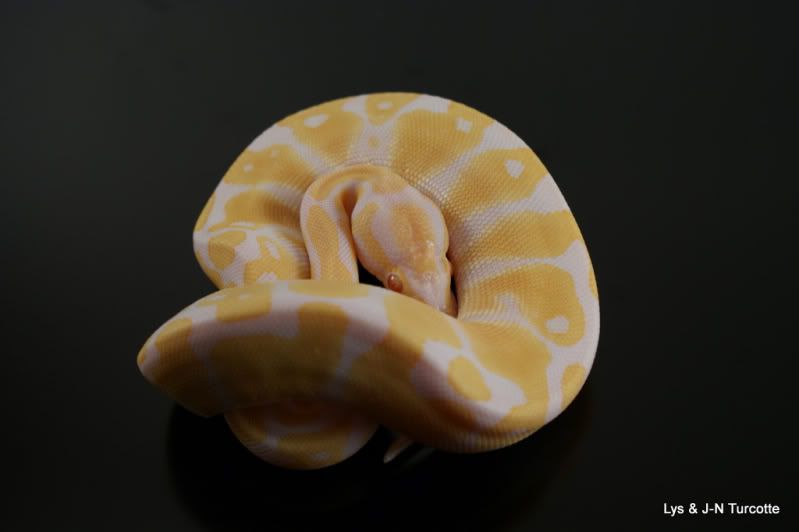
Focal Lenght : 40.00mm (35mm equivalent : 60mm)
1/80s
f/5.6
ISO : 200

I also did some modification with GIMP by rebalancing the white, and adding a whiter background. But I would like to shoot without needing this as much as possible.

before :

after :

So if anyone could help me with a few tips, I would like to
Like what shutter speed, aperture and ISO I should be using.

Thank you !
-----
love this world, don't hate it.

Replies (3)

chrish Oct 31, 2009 04:43 PM

There are two issues here to separate. White balance adjustments make your whites white, rather than yellowish or bluish. However, when your whites come out gray (colorless), the problem is underexposure.

When you changed the ISO, you were simply changing the exposure. Your ISO 100 shots are underexposed, your ISO 400 shots are overexposed.

Photographing animals on white backgrounds is very tricky. Black backgrounds are equally tricky. The problem is that the camera tries to make everything a middle gray tone. So whites get underexposed and turn out gray and blacks get overexposed and washed out.

The way to solve this is to figure out the correct exposure and set the camera manually. You can do this by experimenting with the empty setup. Take a series of exposures and then check the exposure on the computer for the blank background you want without it being too dark or too light.

If you then set you camera to manual and use that exposure, you should get the results you want.

Of course, setting the background to white or black in the Gimp is just as easy. Shoot the pictures in RAW and then adjust the exposure in the GIMP to get the background to become unobtrusive.

When using a black or white background, it is easier to get that featureless effect if you use a flat white or flat black surface rather than a reflective/shiny one.

Here's a shot I took on a black table. I adjusted the background in Photoshop to make it completely black by adjusting the exposure.


-----
Chris Harrison
San Antonio, Texas

Watever Oct 31, 2009 07:47 PM

I took a few shot in RAW but I can't open them in GIMP.

I downloaded the UFRAW software/plugin, but still doesn't work. I didn't bother too much to make it work, since I should have my new computer on tuesday, and I will try on this new configuration instead.

"The way to solve this is to figure out the correct exposure and set the camera manually. You can do this by experimenting with the empty setup. "

You mean changing the aperture and shutter speed ? Or playing with the white balance ?

Cause I think the white balance, is adjusted for the 18% gray (for human caucasian color), is it possible that's why I see grey instead of white ? or it's not related ?

"Shoot the pictures in RAW and then adjust the exposure in the GIMP to get the background to become unobtrusive. "

How do you exactly adjust the exposure that way ?
-----
love this world, don't hate it.

chrish Nov 01, 2009 02:54 PM

I took a few shot in RAW but I can't open them in GIMP.

I think the newer versions of GIMP will read Sony ARW files.

"The way to solve this is to figure out the correct exposure and set the camera manually. You can do this by experimenting with the empty setup. "
>>
>>You mean changing the aperture and shutter speed ? Or playing with the white balance ?
>>
>>Cause I think the white balance, is adjusted for the 18% gray (for human caucasian color), is it possible that's why I see grey instead of white ? or it's not related ?

The white balance won't make whites gray. Having the wrong white balance will make whites yellow, or red, or blue, etc. If your whites are gray, they are underexposed.

"Shoot the pictures in RAW and then adjust the exposure in the GIMP to get the background to become unobtrusive. "
>>
>>How do you exactly adjust the exposure that way ?

I don't use the GIMP very often since I have Photoshop elements. There is certainly a "levels" or exposure adjustment somewhere in there. You would just increase or decrease the exposure to get the background where you want it.
-----
Chris Harrison
San Antonio, Texas

Site Tools